Step-by-step help with Toddle that’s simple
Practical walkthrough videos for teachers using Toddle, not tech experts.
💡 If you want a good place to start, jump into the Class Flow video as it lays the groundwork for how everything connects.
Then the Grading video is a fun follow-up because you’ll see how it all comes alive with the Student Impersonation trick.
After that, just dip into whichever videos you need.
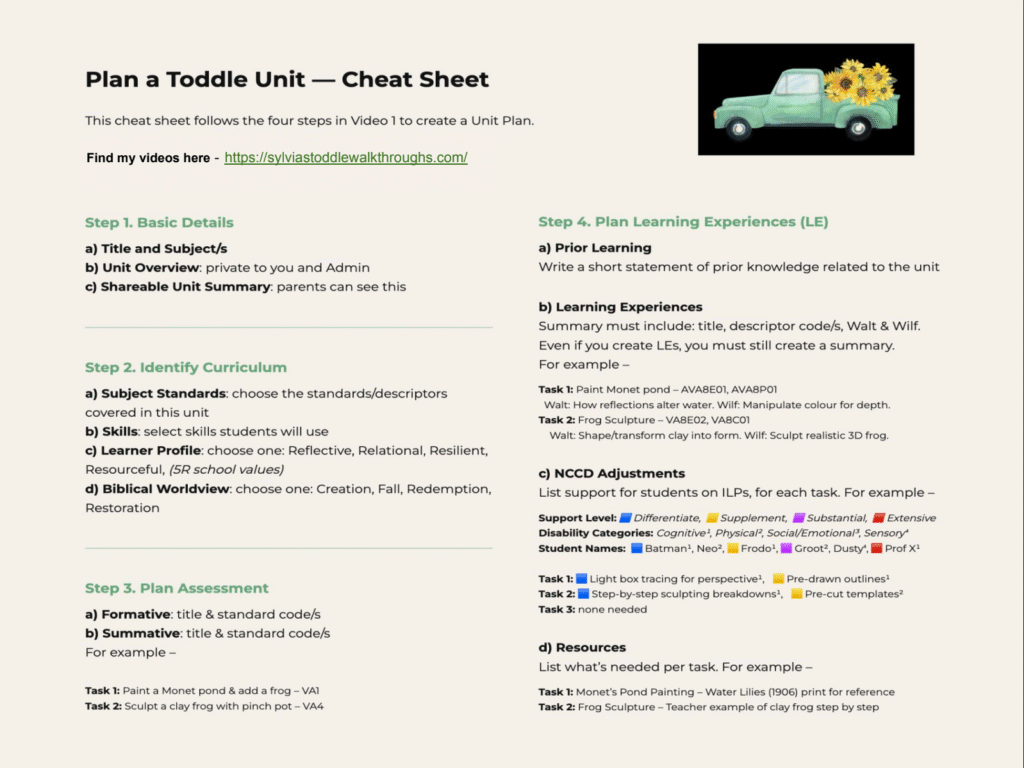
Section 1 — PLAN: How to Plan a Unit
This 10-minute walkthrough shows how I set up a Toddle unit using my old Term Planner. Grab the Cheat Sheet and get started.
Section 2 — FLOW: Create a Class Flow for LEs and PTs in Toddle
How to design learning experiences, checkpoints, and build evidence flow using Toddle’s structure.
How to Use Class Flow in Toddle – 10 mins
Learn how to set up Class Flow to organise projects, track checkpoints, and keep all student evidence in one place.
How to Create a Learning Experience (LE) – 5 mins
Learn how to create a clear Learning Experience Task in Toddle.
Transform an LE to a Performance Task (PT)
– 3 mins
Learn how to turn any LE into a Performance Task in just two clicks.
Assigning LEs and PTs in Toddle + Portfolios
– 5 mins
Learn how to assign LE’s or PT’s and create Student Portfolios
Section 3 — ASSESS: Student Impersonation and Project Grading
How to grade, upload evidence, and support students with visibility, marking, and evaluation tools.
Project Grading & Student Impersonation – 8 mins
Learn how I grade project work in Toddle, upload work for them, and manage visibility.
How to Grade in Toddle using the Rubric – 5 mins
Learn how to grade PTs in Toddle using the rubric selector and gradebook.
Create a Workbook in Toddle – 4 mins
How to set up workbooks using templates, custom layouts, or start from scratch.
How Students Upload Work in Toddle – 4 mins
A demo showing exactly what students see when uploading their work in Toddle.
Section 4 — MONITOR: Weekly Planner & Learning Sequence
How to map and navigate learning from term to week level, and where sequencing becomes visible.
How do I create and use the learning sequence? – 2 mins
How to use the Learning Sequence to map your unit planning visually.
How to use the Weekly Planner in Toddle? – 6 mins
How to build a Weekly Planner, add lessons, and navigate your week.